Art Gallery of Ontario
Art Gallery of Ontario Website Redesign
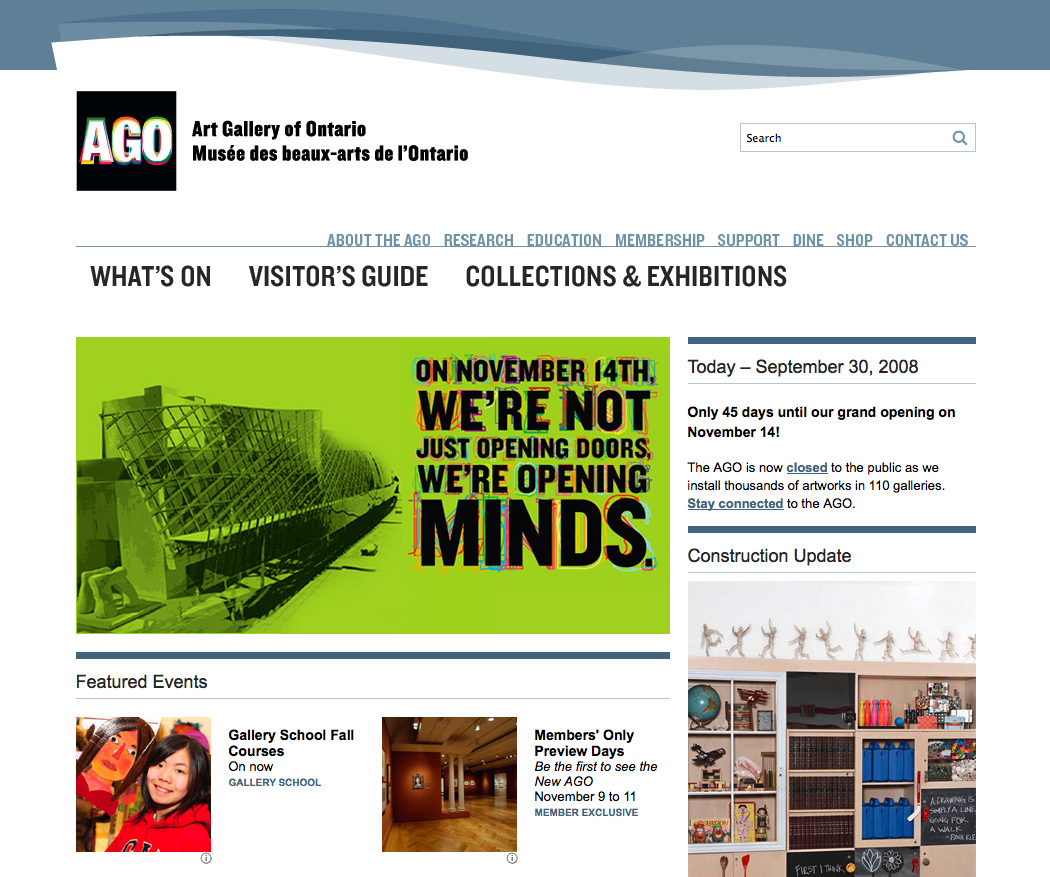
Well, here it is. In the first of four planned releases we’ve introduced a look and feel constructed around the AGO’s new graphic identity. It’s the result of a team effort, and seasons of research.
From a development perspective it’s simply a re-skinning of the legacy ColdFusion site; the CMS we’ve been implementing with Devlin will debut in the coming months.
The new building opens November 14.
AGO / OSC / ROM Web Summit
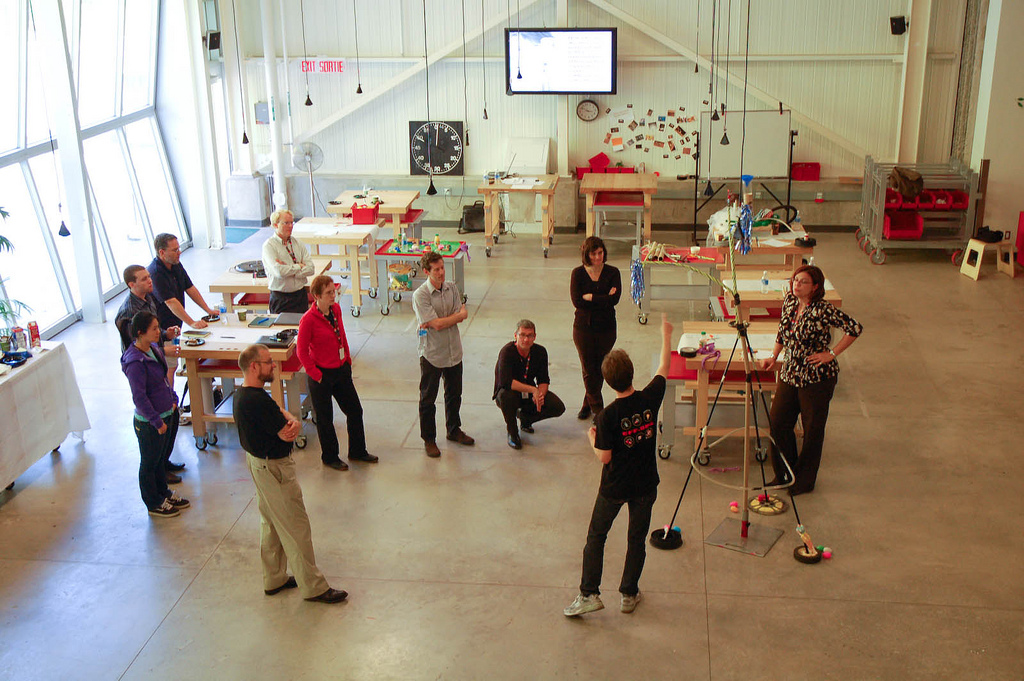
Every few months the web teams of the Royal Ontario Museum, the Ontario Science Centre and the Art Gallery of Ontario get together for a nerd-fest. The events are a welcome diversion from the daily grind of production, and a vital expression of community and common purpose.
Converting the AGO blog from Serendipity to WordPress
Hi there. Been busy, but not posting any of it here. Will attempt to catch up, somewhat. This one will be about some recent work on the Art Gallery of Ontario blog, Art Matters.
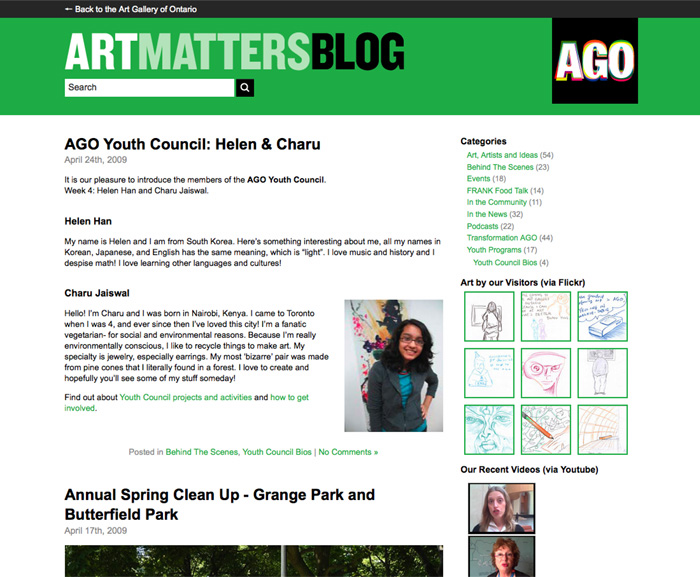
The Art Gallery of Ontario blog was running S9Y, and it was rough. You could tell when someone was entering a post because they’d start cussing. Myself included. It seemed to me the platform was handicapping the project and needed to be upgraded.
Because of the legacy data that needed to be migrated, this project was really about using Technosailor’s Serendipity importer for WordPress. This plug-in made the whole thing feasible.
Our installation hadn’t been upgraded in years, so the first thing was to upgrade Serendipity to the version the plug-in likes (not the latest one). Fine. There was some tweaking to do of the plug-in code, as discussed in the documentation/comments. Fine.
The big hiccup was that the importer had trouble with special characters in the posts. When it came to a non-validating character it would just stop and skip to the next. Also, it lost the authors and the category assignments.
No doubt, these issues could be fixed and the plug-in could be made to run like a dream. But for the number of posts I had I decided it would be quicker to just do it by hand.
Even so, the plug-in was essential. It created entries for everything with timestamps and, importantly, migrated the comments. Post bodies and categories (author assignments were irrelevant) were a matter of a couple hours copying and pasting.
(If you’re thinking, “copying and pasting?! What a lightweight!” well, you know where the comment box is, big shot.)
The last part was forwarding the permalinks and feeds, which was solved with a library of case statements.
While the process was less elegant that it could have been, I’m very happy to have made the move. Skinning in WP is more nuanced than in S9Y, and of course there’s plug-ins for all functionality under the sun. The content editors are happy with the interface, and we’re moving more and more features to the blog. On that front we’re just getting started, and the WP platform makes it possible.
Creating the Grange Prize Online Vote
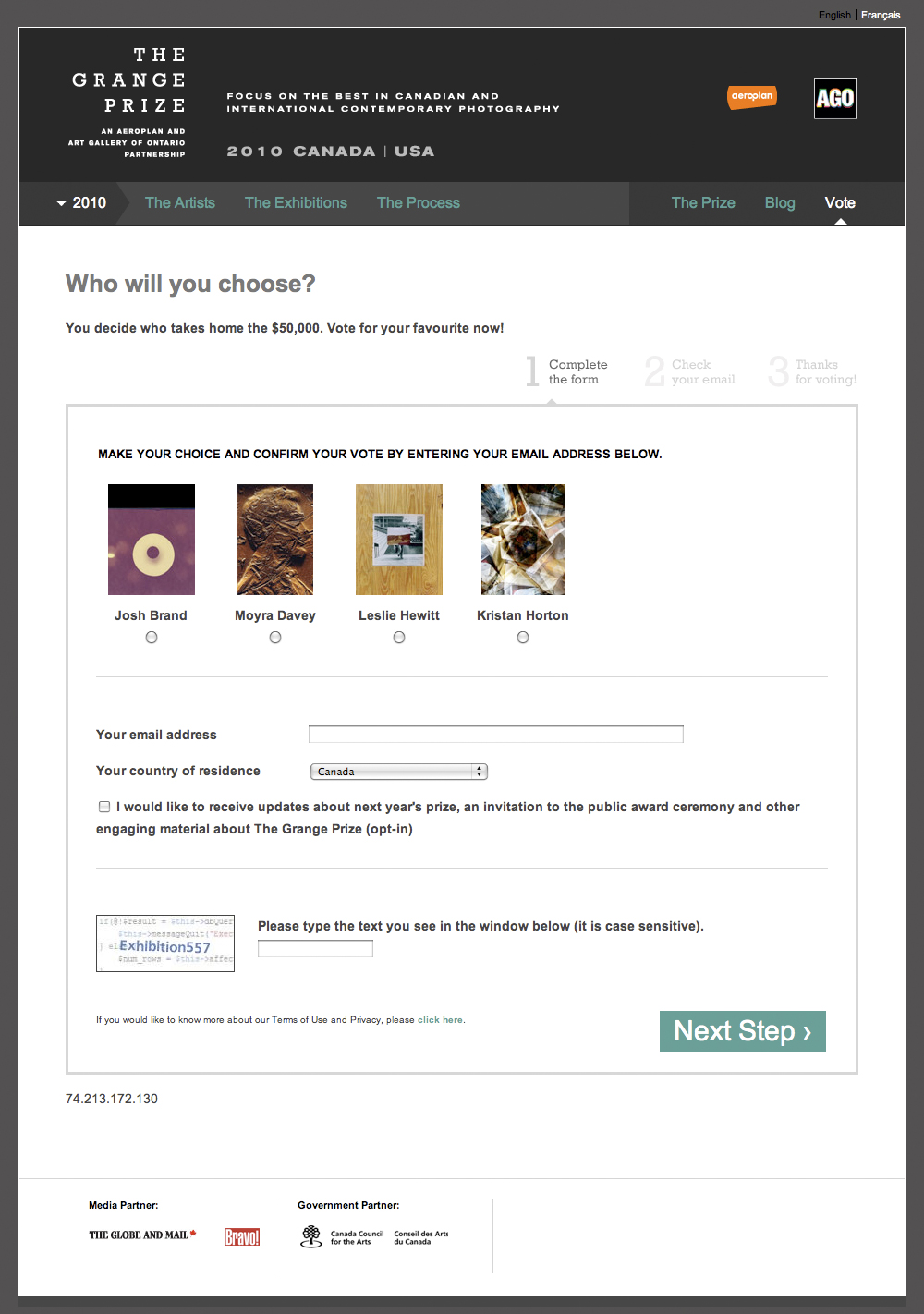
The Grange Prize is an annual contemporary photography prize. The winner is chosen through a people’s-choice vote conducted in-gallery and online. When the AGO took over the site this year, our goal was to create an easy to use and reasonably secure voting mechanism. The rules of the vote were simple — one vote per email address. This meant the main thing we needed to do was verify email addresses. We realized we already had the capability to do this, in the form of the double-opt-in mechanism of our list manager.
What is Double-opt-in? A user submits an address using an online form – that’s the first opt-in. Addresses are stored in the system and marked “unconfirmed.” Then the user confirms the action by clicking a link in an email – that’s the second opt-in. It is not until the verification link is clicked that it is marked as “active” or “confirmed.”
The choice being voted on – in our case Artists – were “segments” of the list. Segments are simply a second column of data, typically holding some sort of preference or demographic data.
So mainly we used the system as designed, simply changing the language presented to the user so that “subscribe” became “vote.” Easy!
Details, Details
There are many, many list management options out there. The ideas outlined above probably apply to any system. We happen to use a system called Cakemail, which has its own peculiarities.
In Cakemail, if a previously confirmed address is re-submitted it is marked as unconfirmed until the verification link is clicked. To ensure votes were not invalidated in this way we needed to check that an address had not already been confirmed.
Luckily, Cakemail provides a way to do this. If you pass an email address to a certian URL, it will return either a “1” or a “0” in response. So when the user submits their address we used this PHP class to get the response from that URL and from there it’s a simple ‘if/else” to either submit the address to the system or redirect to a ‘Sorry, you’ve already voted’ message.
One last thing to mention is the CAPTCHA, which is used to verify that the from is being submitted by a human being rather than an automated bot. For this we used eForm, which is part of the ModX content management system upon which the site was built.
Museum Website Top-Level Navigation Items
How many navigation items do museum websites have? How are they split? What are the most common terms? I looked at 35 museum websites and this is what I learned:
60% of sites split their persistent navigation into two groups (usually with different font sizes or visual treatment). In this case, the average number of buttons is 13, with 8 in one group and 5 in another.
For the 40% of sites presenting all their top-level items in one group the average number of buttons is 9.
The average number of buttons overall is 11.5.
The most common terms are as follows:
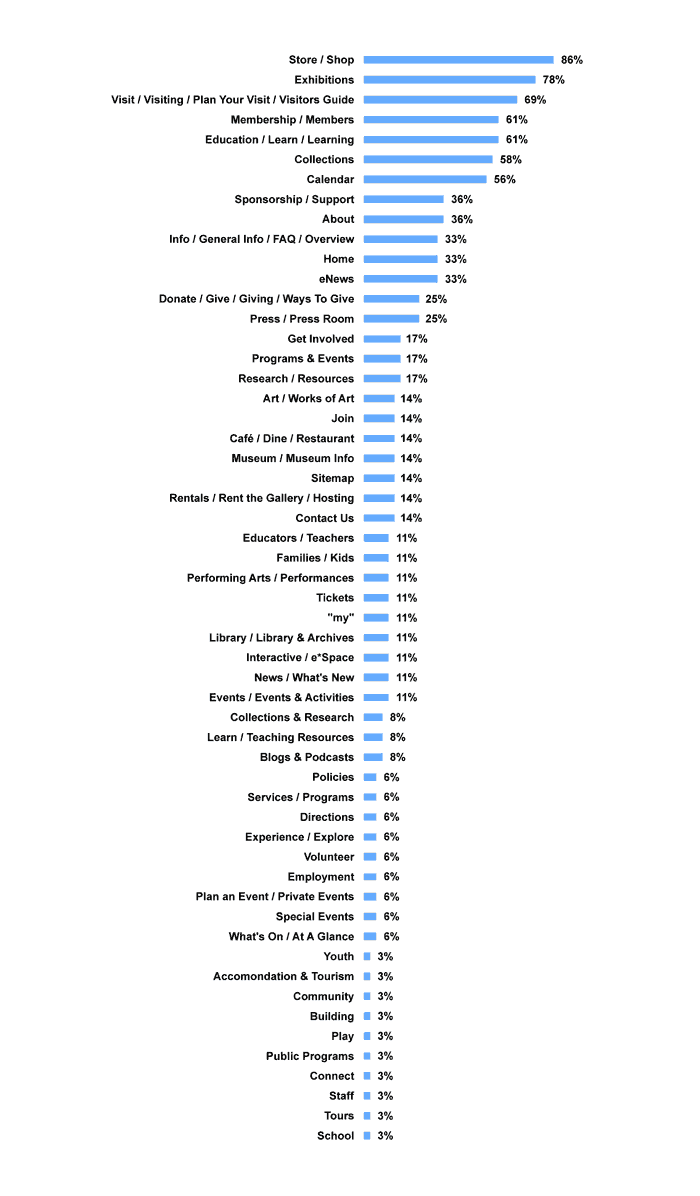
This research was conducted in March 2008 at the Art Gallery of Ontario. The 35 sites surveyed were: Glenbow, Skirball, Vancouver, Sfmoma, San Jose, LA MOCA, Phoenix, Colorado, Carter, Houston, New Orleans, Norton, High, Chrysler, Cincinnati, Indianapolis, Wexner, Baltimore, Chicago, Milwaukee, Albright-Knox, Montreal, Guggenheim, Brooklyn, Quebec, MoMA, Tate, Louvre, National Canada, ROM, Philidelphia, Detroit, Met, Chicago, National USA.
Museum Information Architecture: Where Are Weddings?
Weddings and other private events are a major source of revenue for museums; I’ve heard it said they “keep the lights on.” But where on a museum’s website will you find information on this service?
We grappled with this question in 2008 at the Art Gallery of Ontario as part of an information architecture review. From the museum’s perspective it’s an important business — does that mean it warrants a “tab” in the top level navigation? Some museums have it there. But on the other hand, it’s irrelevant to the vast majority of the site’s users, who are looking for current exhibits and the hours of operation. Also, how is it referred to? “Special Events” seems common in the event industry, but it conflicts with other museum initiatives such as fund raising galas. “Private” indicates exclusivity.
Here’s what I found in a survey of 50 museum websites:
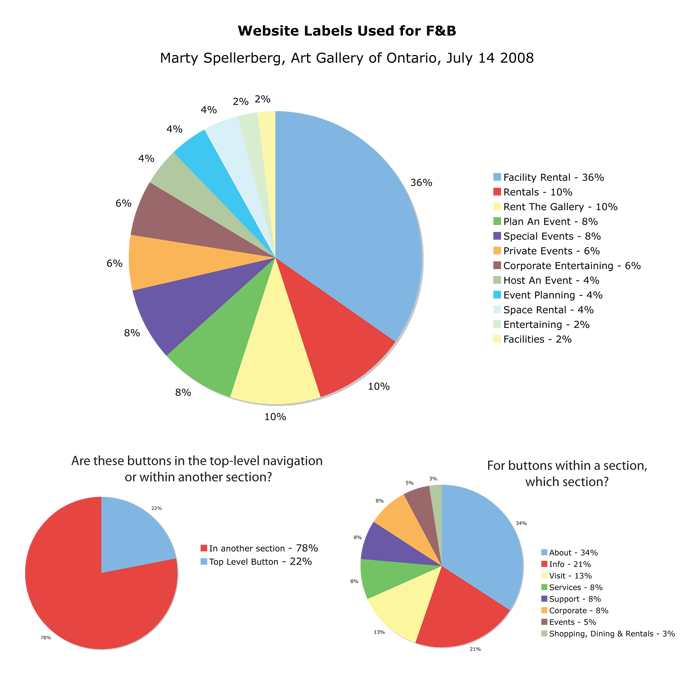
“Facility Rental” came out as the clear winner, with 36%. While 22% made it a top-level priority, the majority put it within another section. Which section? “About” with 34%, or “Info” with 21%.
At the AGO we used these findings to inform the decision to call our section “Venue Rental” (which sounds nicer while still avoiding conflict) and link it under “About.”
The sites surveyed were: Skirball, Vancouver, Sfmoma, San Jose, LA MOCA, Phoenix, Colorado, New Orleans, Norton, High, Chrysler, Cincinnati, Indianapolis, Wexner, Baltimore, Chicago, Milwaukee, Albright-Knox, Guggenheim, Brooklyn, MoMA, Tate, Louvre, Canada, ROM, Philadelphia, Detroit, Met, Chicago, Bata, Kansas City, New Museum, Walker, Calgary, Kamloops, Nanaimo, Two Rivers, Victoria, Fredericton, Hamilton, McMichael, Nova Scotia, Mendel, MacKenzie, Anchorage, Birmingham, Boise, LA County, de Young, New Brit.
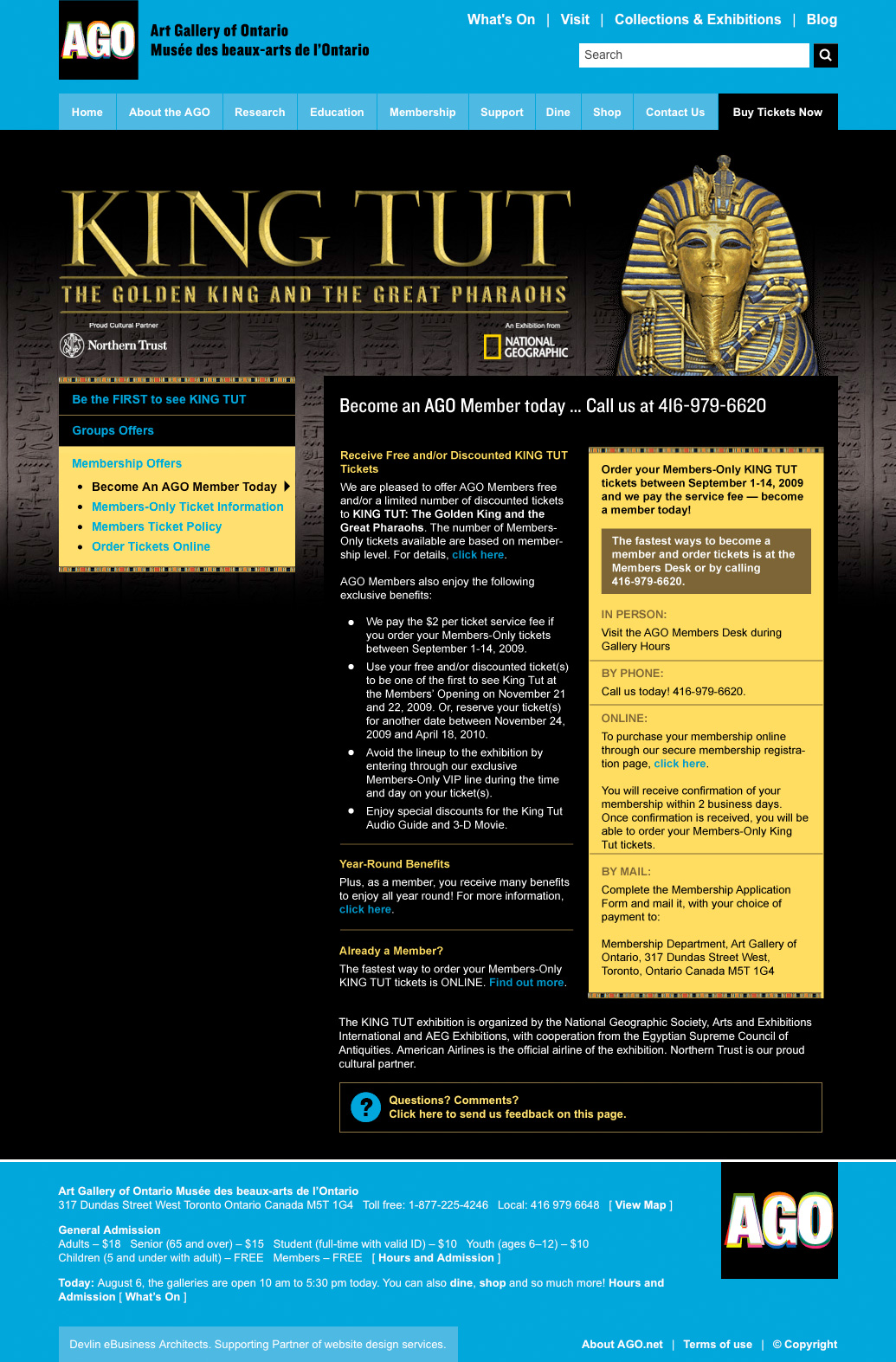
King Tut Membership microsite for the
Art Gallery of Ontario
The AGO had a lot riding on King Tut in 2010. The museum reopened to great fanfare the year before, but the recession hit hard and revenue targets were proving hard to hit. A 1979 Tut exhibition had sparked “Tutmania” throughout Canada and brought more than 750,000 visitors to the AGO; the museum hoped the sequel would prove a comparable blockbuster.
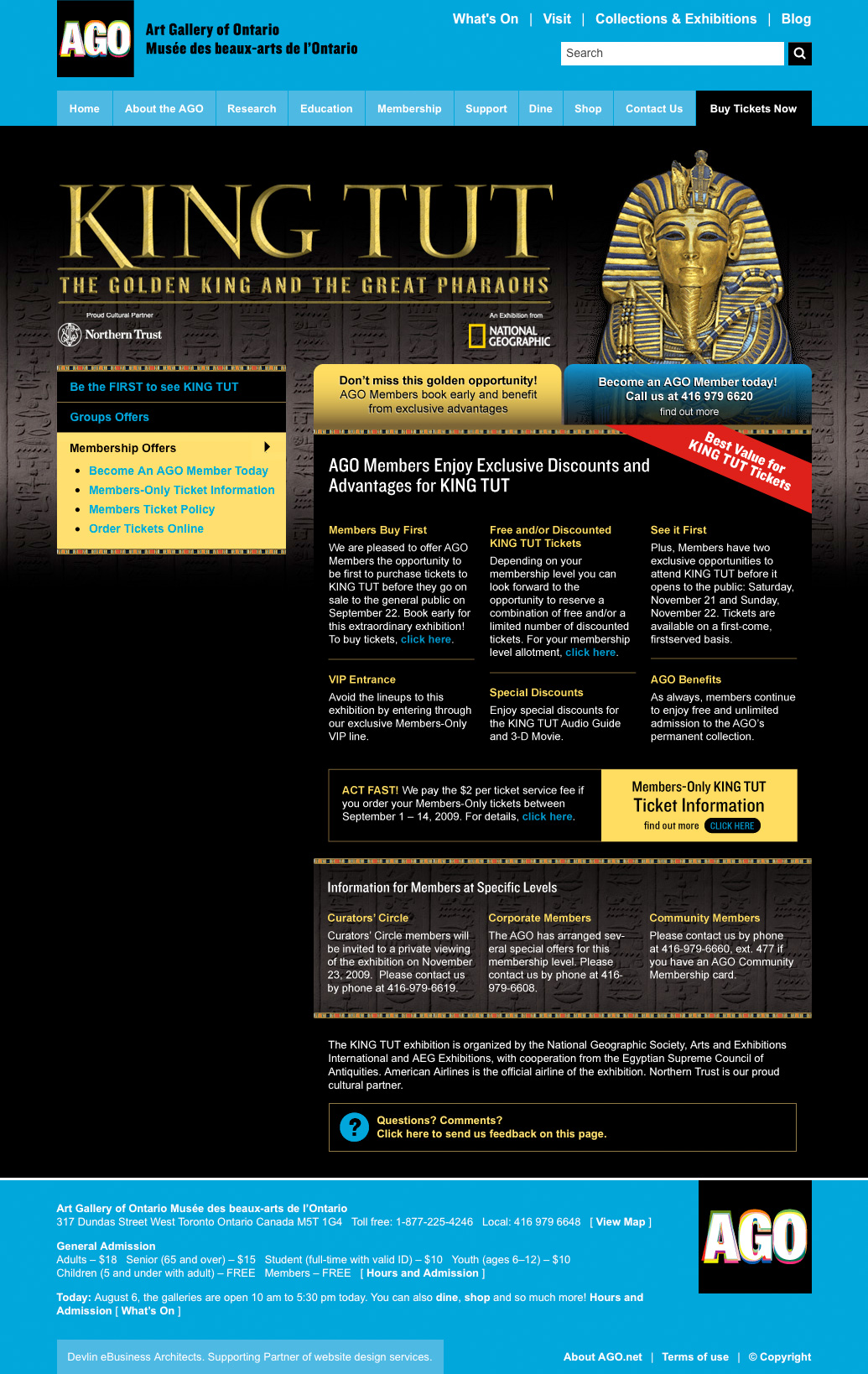
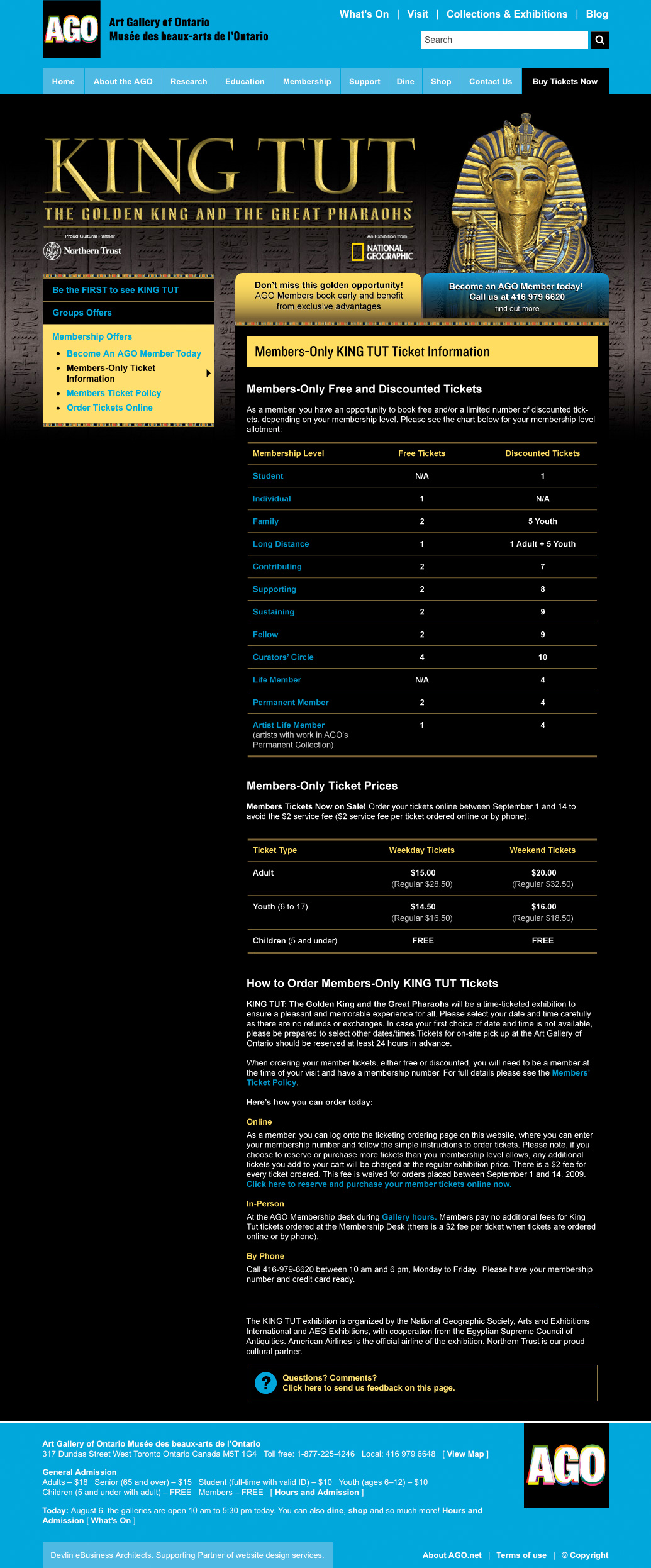
We knew Tut would bring the Gallery to the attention of a huge number of people that were not normally museum-goers. The Development department was determined to seize this unique opportunity to convert them to museum members. Expectations were also high among existing customers, who expected to reap the benefits of their membership. Our team created this collection of pages to communicate with both audiences.
Working in-house at the AGO, I received a packet of info that was, in a way, a brain-dump. Written by my colleagues in Development, it was packed with information they knew we needed to convey. It contained a pitch to prospective customers, as well as information specific to members at various levels, and a run-down of a time-ticking procedure that was unusual for the Gallery. The first thing I did was comb through the text, grouping like-with-like and eliminating redundancies. I followed this with a design that applied the AGO’s King Tut identity in a layout that maximized the visual interest of otherwise dense information. Once the scheme was accepted and approved, I put it together using HTML/CSS and our ModX-based CMS.
It was an enjoyable project, executed smoothly, and I was glad to contribute towards an objective that meant so much to the museum.
Rolling out Social Media at the Art Gallery of Ontario
I was involved with Social Media at the Art Gallery of Ontario through my position as New Media Developer. Our team’s actions resulted in the creation of a new full-time position to coordinate content for web and social media channels.

Identify Connections
I looked around our organization and saw that there were a number of people doing parts of “social media” but they were in different departments and in some cases had never met each other. I recognized this as an opportunity to increase the efficiency and effectiveness of our efforts.
I initiated monthly meetings where content creators brought forward their material and brainstormed with web publishers ways to present them online. A to-do was noted for each item and this list became the agenda for the next meeting. Representatives attended from the New Media, Education, Communications, and A/V teams. In addition, web-specific meetings were held for all major projects.
Institute Processes
Our team brainstormed ways to add social media to existing forms and administrative procedures. This was especially important with regard to copyright clearance and the production of audio/video material. We focused our attention on material which could be repurposed for our various channels, which were crossed-linked. We initiated and implemented changes to our website and email templates that highlighted our social media channels. We added Social Media questions to our existing survey of program participants, which gave our information architecture a demographic baseline (see graphic, above).
Recognizing that most material posted by the Gallery crossed my desk on its way online, I started the AGO’s Twitter feed and posted links to material as it went live. In addition, I shared the account information with the rest of the team, who used it according to their perspective — publicists in service of building buzz, educators in service of engagement. Other tools in our kit included Youtube, Facebook, Flickr and the AGO’s own blog. A member of our team brought forward Tumblr, which we adopted for our “Art of the Day” feature. This was a feature we had implemented on our own site, but by moving it to Tumblr we gained that platform’s passionate audience as well as automatic integration with Twitter. As our efforts progressed we became concerned with new material created especially for these channels and crafted to their specific strengths.
Present to leadership
After a period of work using these processes, our efforts were noticed outside and within the organization. Members of our team were invited to present at conferences and were quoted in the media. I was invited to present this work to the Gallery’s leadership team and corporate advisory board, which included the director of Facebook Canada. Discussion at these presentations revolved around appropriate metrics, with emphasis both on what could be expressed through existing language and what new measures could be defined. It was identified that our efforts needed to be incorporated into a broader institutional strategy.
This resulted in the creation of a new full-time position to coordinate content for web and social media channels. I provided documentation of my Social Media processes and procedures, which were integrated into the portfolio of the new position.
I am pleased that our grass-roots efforts benefited the organization and led to positive change. I am currently testing the applicability of these techniques to other projects in the visual arts.