Research
Page 3 of 3
When Doors Close, Where Do Audiences Go? Analyzing Museum Web Traffic During Crisis
I spoke with journalist Alexander Panetta of CBC News for a story on museums’ use of technology during the pandemic:
Despite this historic opportunity for online learning, with hundreds of millions of people locked out of public spaces, [Spellerberg] says traffic to museum websites plummeted last year.
He began gathering data from 20 museums, mostly American, when the coronavirus struck, and says all but a couple saw their web traffic go down. The average decrease, he says, was 13 per cent.
“The pandemic hits — and you see everybody’s numbers just drop off,” he said.
How can that be? Spellerberg says most people still use museum websites to plan a visit — check opening hours, buy tickets or scan information on exhibits or collections.
Two institutions that were exceptions to his rule happened to be the largest on his list. The Metropolitan Museum in New York and PBS’s interactive museums pages saw web traffic increase.
Here’s the Data
With help from research assistant Grace Poole, I collected Google Analytics Sessions data from cultural institutions. Participants self-selected/opted-in to the project and represent a wide range of institution types and sizes.
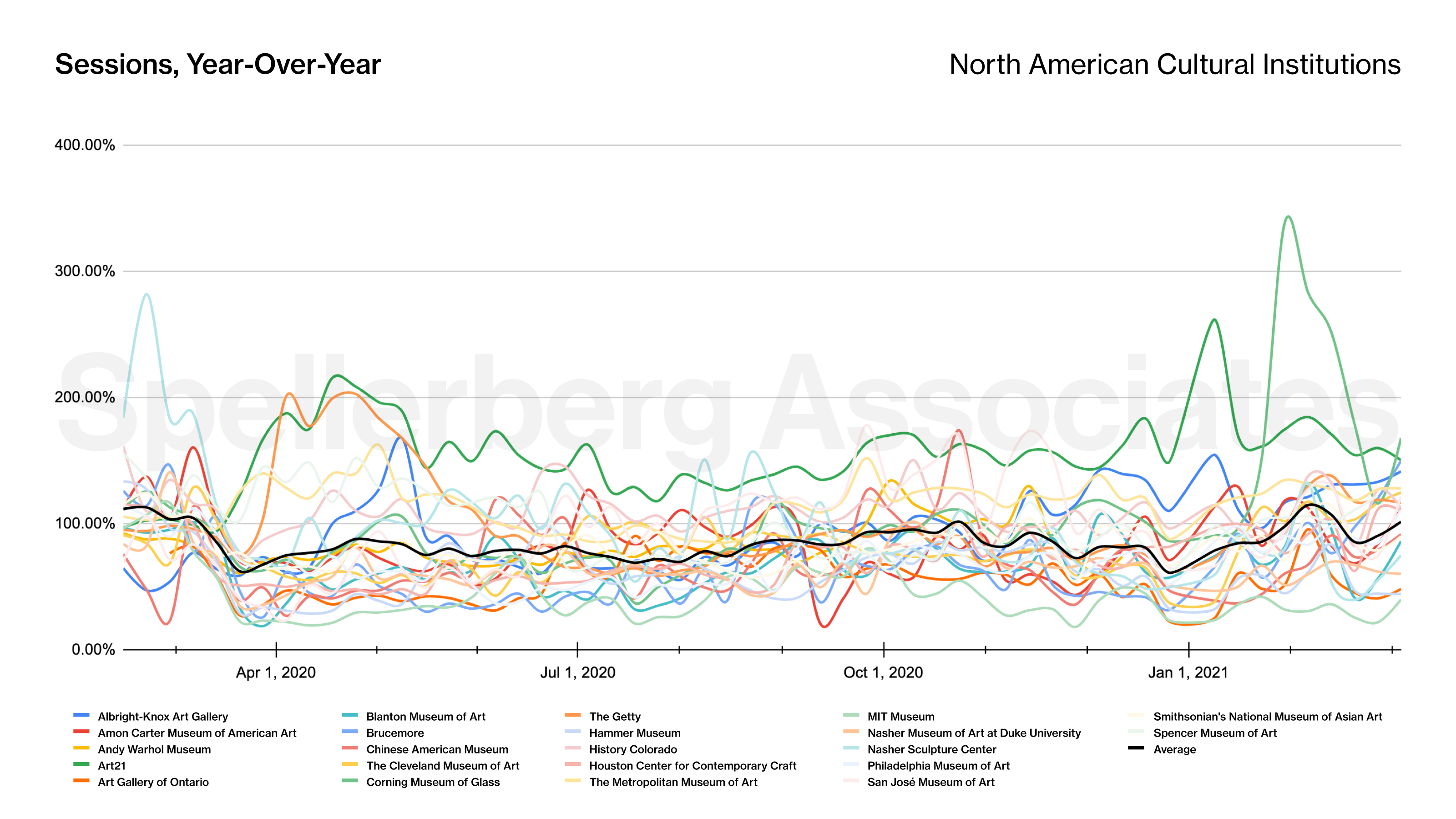
Figure 1 shows 22 institutions in North America, with the average of that set highlighted in black. The lines represent year-over-year percentages. Each institution’s 2020 traffic compared to their 2019 numbers (100% line means parity with pre-pandemic traffic). The average reveals a clear drop corresponding to lockdown, and it stays under 100% for most of the year.

While the average saw a drop of approximately 13% for the year, a few institutions experienced increased traffic. Figure 2 highlights how the websites of Art21, the Metropolitan Museum of New York, and History Colorado experienced web traffic above their pre-pandemic levels throughout the study period. The causes of these increases are likely specific to those institutions’ situations and warrant qualitative examination.
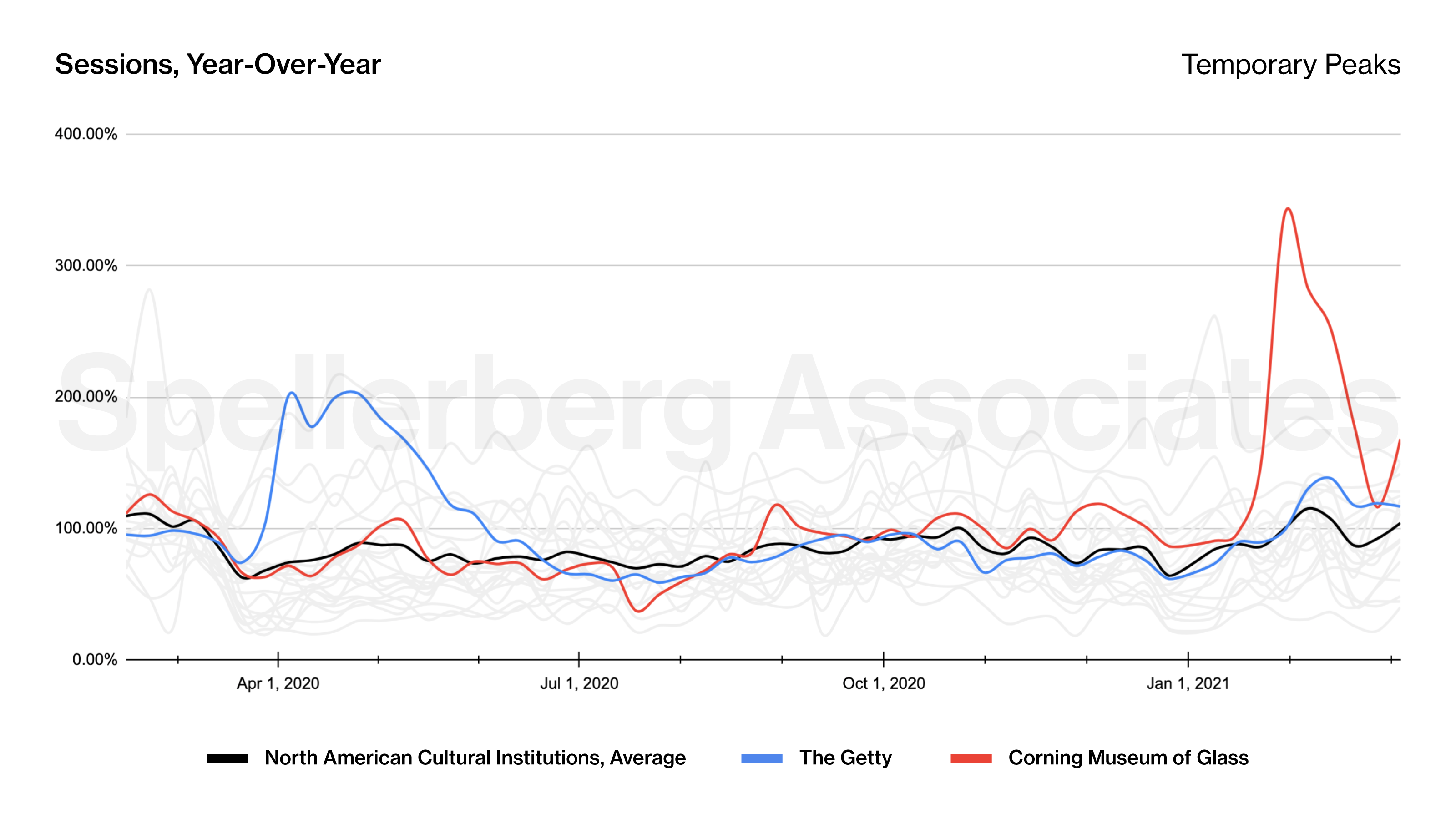
Figure 3 highlights a couple of institutions that experienced dramatic spikes in traffic for limited periods of the year. In both of these cases, we have a pretty good idea of the cause. The increase of traffic to The Getty‘s websites corresponds with the popularity of their “Getty Art Challenge” social media campaign. Tim Hart, Head of Audience Research and Analysis at the Getty, explored these results in a session we presented at the 2020 MCN conference. And the dramatic spike experienced by the Corning Museum of Glass corresponds to their participation in Blown Away, the reality show on Netflix.
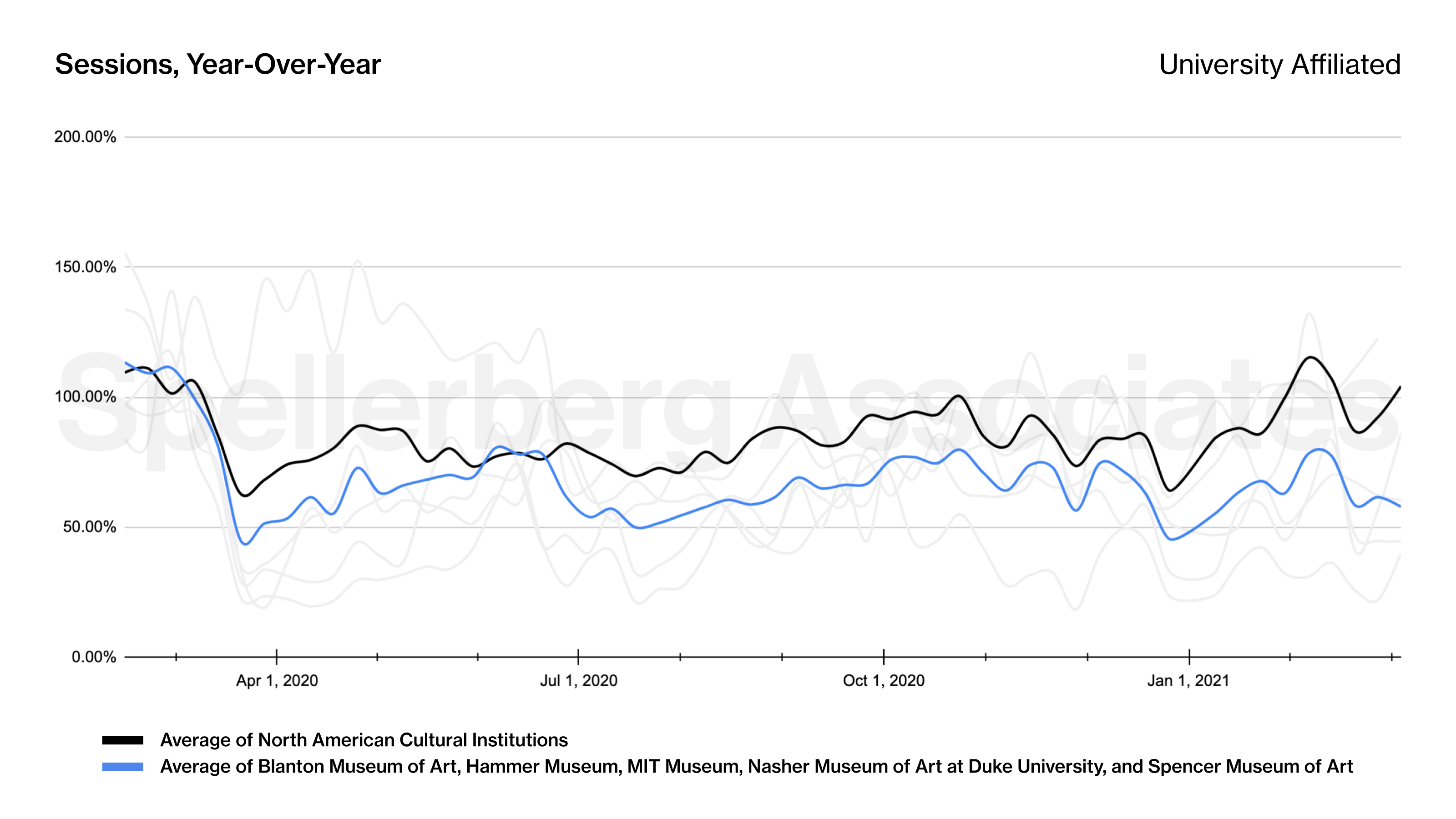
Five of the study participants are university-affiliated museums. Figure 4 highlights that these institutions, on average, saw web traffic that was consistently beneath the benchmark of the study as a whole. Is this indicative of university affiliation, or simply a coincidence? We will require additional data to answer these questions.
I undertook this research, in part, as a way of grappling, on a personal level, with the uncertainty of COVID-19. I hope that this data is helpful to researchers and informative to practitioners. If you are interested in discussing this work and exploring the implications of these findings for your institution’s digital strategy, please reach out via email.
Thank you to the participating institutions: Albright-Knox Art Gallery, Amon Carter Museum of American Art, Andy Warhol Museum, Art21, Art Gallery of Ontario, Blanton Museum of Art, Brucemore, Chinese American Museum, The Cleveland Museum of Art, Clyfford Still Museum*, Contemporary Art Museum St. Louis*, Corning Museum of Glass, The Getty, Hammer Museum, History Colorado, Houston Center for Contemporary Craft, Institute of Contemporary Art Boston*, The Metropolitan Museum of Art, Mingei International Museum*, MIT Museum, Nasher Museum of Art at Duke University, Nasher Sculpture Center, Philadelphia Museum of Art, San José Museum of Art, Santa Cruz Museum of Art & History*, SKMU Sørlandets Kunstmuseum*, Smithsonian’s National Museum of Asian Art, Spencer Museum of Art, Terra Foundation for American Art*, Whitney Museum of American Art*.
* Participated in the project but are not reflected in the charts presented here
Museum Computer Network (2021/22)
The Museum Computer Network (MCN) is a US-based non-profit organization for professionals with an interest in the use of computer technology for museums. In 2022 we performed qualitative consumer sentiment analysis research for the association of museum technology professionals, Museum Computer Network (MCN). We employed focus groups and individual interviews to produce a report that informed the MCN board’s deliberations on strategic direction.
Data-Driven Insights for Museum Virtual Event Programming
During COVID, as museums took their institutions online, event programming became a viable space to adapt to new monetization paths and presented potential new business practices. After we published our research into how the pandemic affected and shaped museum website visitation, colleagues in the museum technology field (shoutout MCN!) suggested virtual event programming would make for a compelling next topic.
This cross-institutional research highlighted best practices and ways forward for virtual events in the museum sector. We sought out cross-industry event trends by analyzing quantitative data from about twenty institutions nationwide. We wanted to know what elements made for the most successful virtual events as measured by attendance.
Research Cohort
When selecting participants for our research, we sought various perspectives and voices within the museum sector. We wanted a variety of perspectives to speak to how museums approached virtual events during the pandemic.
Institutions that contributed data to this project.
We are grateful to the Akron Art Museum, Buffalo AKG Art Museum (formerly the Albright-Knox Art Gallery), Amon Carter Museum of American Art, Art Gallery of Ontario, Blanton Museum of Art, Brucemore, Chinese American Museum, Cleveland Museum of Art, Corning Museum of Glass, Europeana, Hammer Museum, History Colorado, Museum at FIT, Nasher Sculpture Center, and Philadelphia Museum of Art for contributing data.
The charts in this post are based on a subset of the data we collected. The subset contained 752 events presented in 2020 and is weighted toward the Hammer Museum (27%) and Buffalo AKG Art Museum (26%). The subset also contained records from Philadelphia Museum of Art, Amon Carter Museum of American Art, Art Gallery of Ontario, Cleveland Museum of Art, Akron Art Museum, Nasher Sculpture Center, Museum at FIT, and Brucemore.

The data subset used to generate these charts.
Museum Virtual Events by Date
Each record in our dataset refers to a discrete virtual event presented by a museum. Let’s start by simply charting the number of events over time:
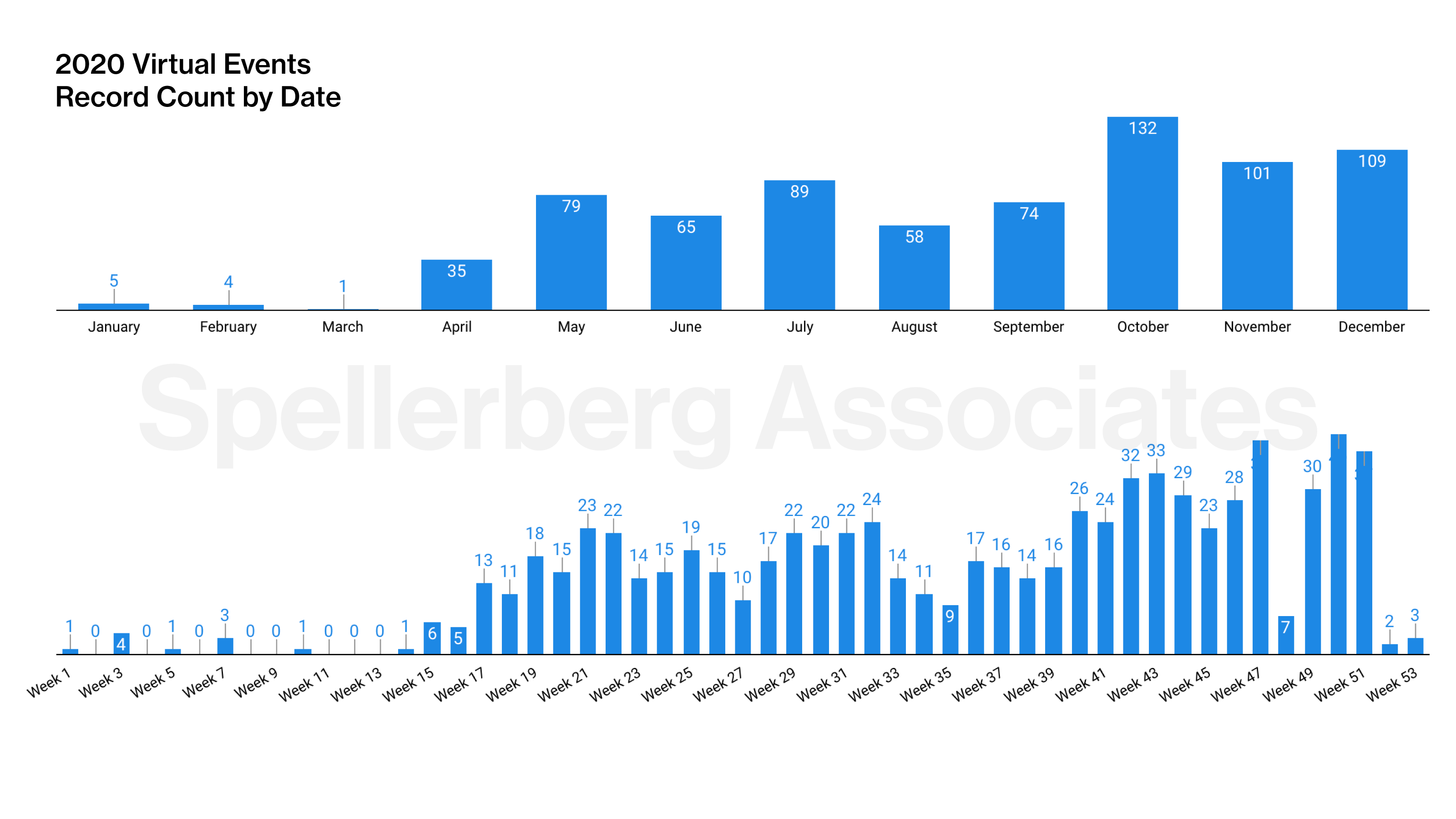
The metric we were primarily interested in was event attendance, so here’s that:
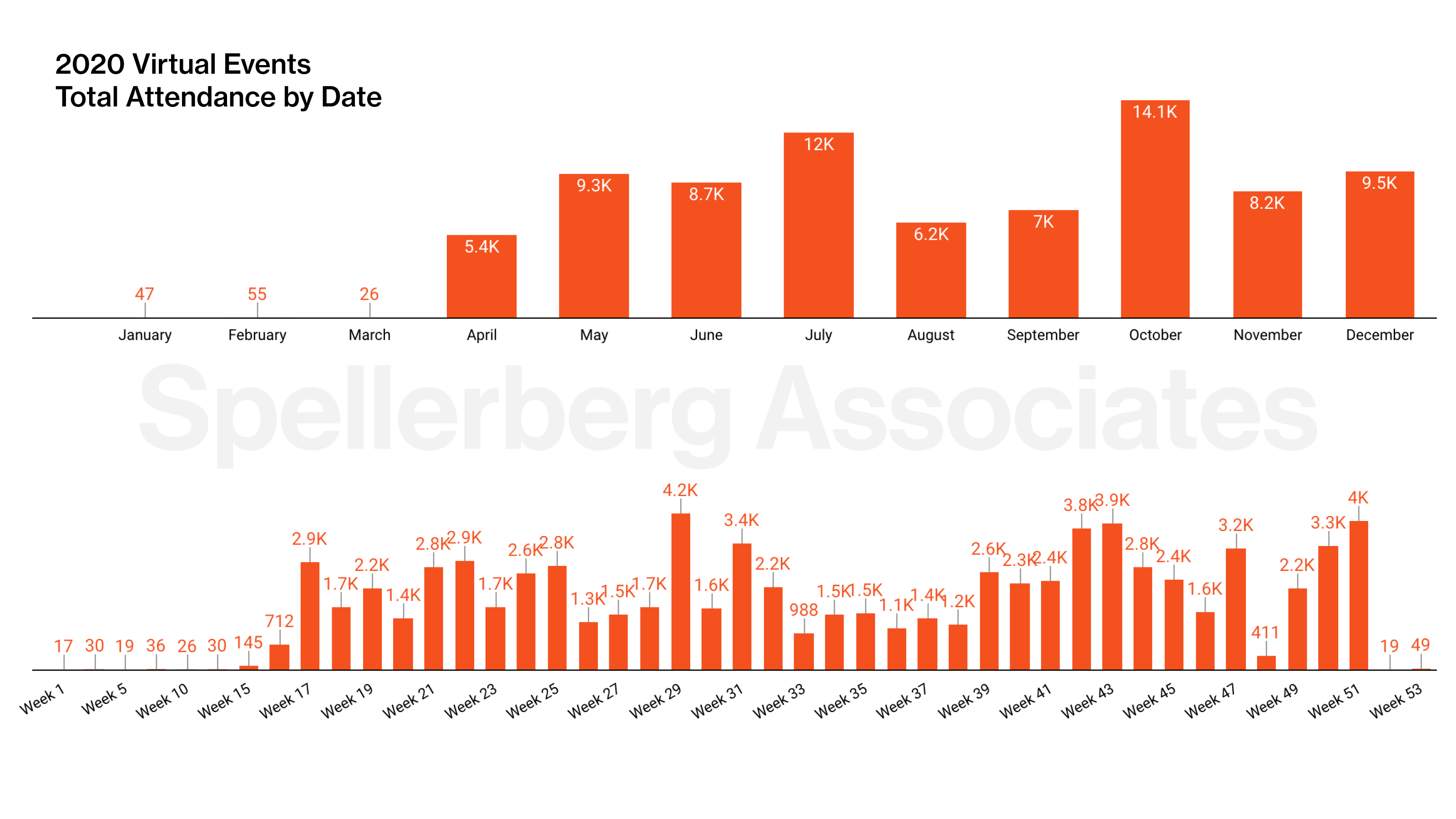
The previous charts are okay as far as they go, but we’re not sure they tell us much. But by dividing attendance by the number of events, we can see a clear trend: Event attendance decreased as the year went on.
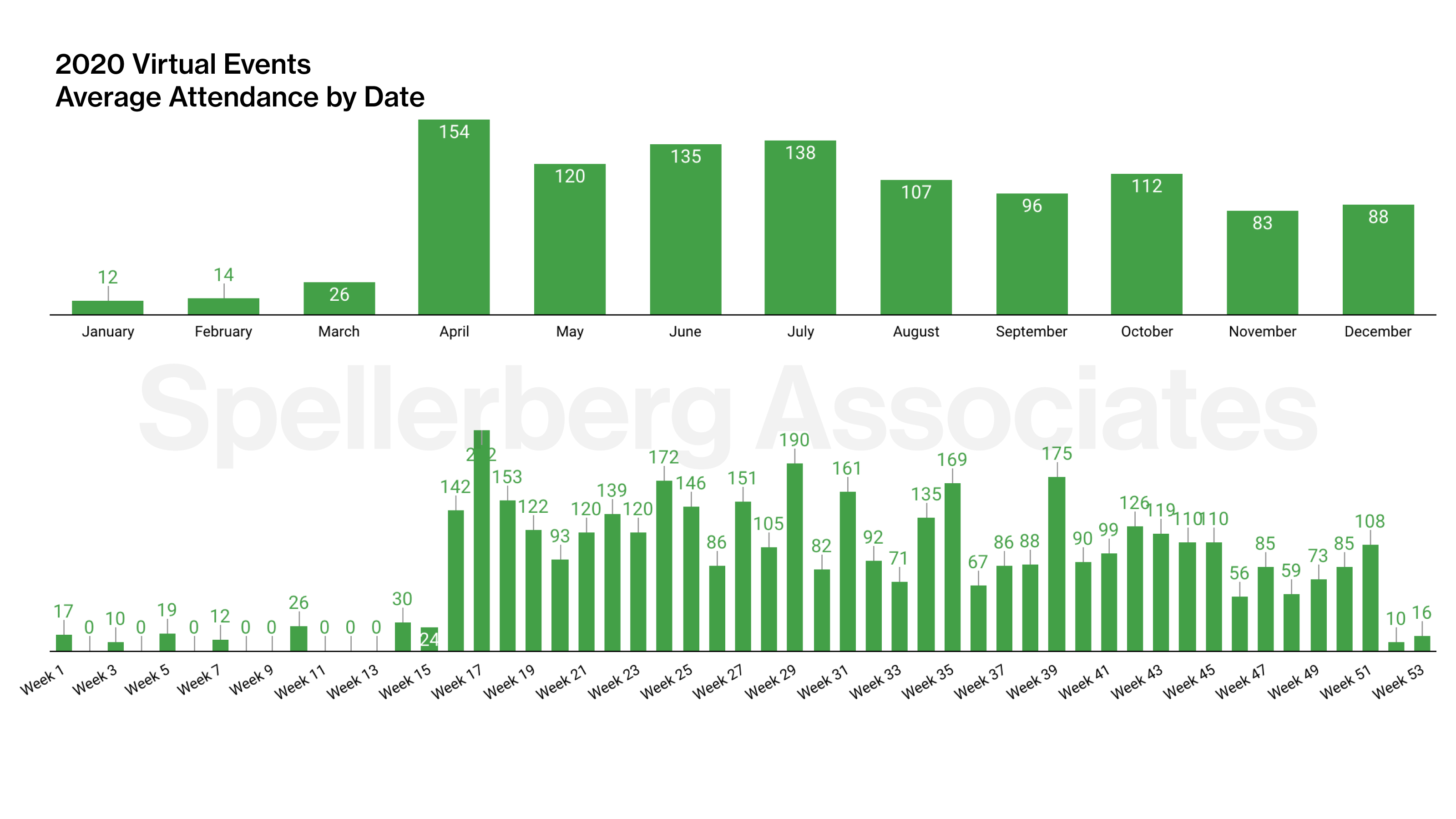
This finding is consistent with what everyone who lived through lockdown experienced — Zoom fatigue was real!
Museum Virtual Events by Day of Week
Next, we were curious if events offered on certain days of the week drew larger audiences than others. Institutions in our subset tended to present their events mid-week, with a peak on Thursdays:
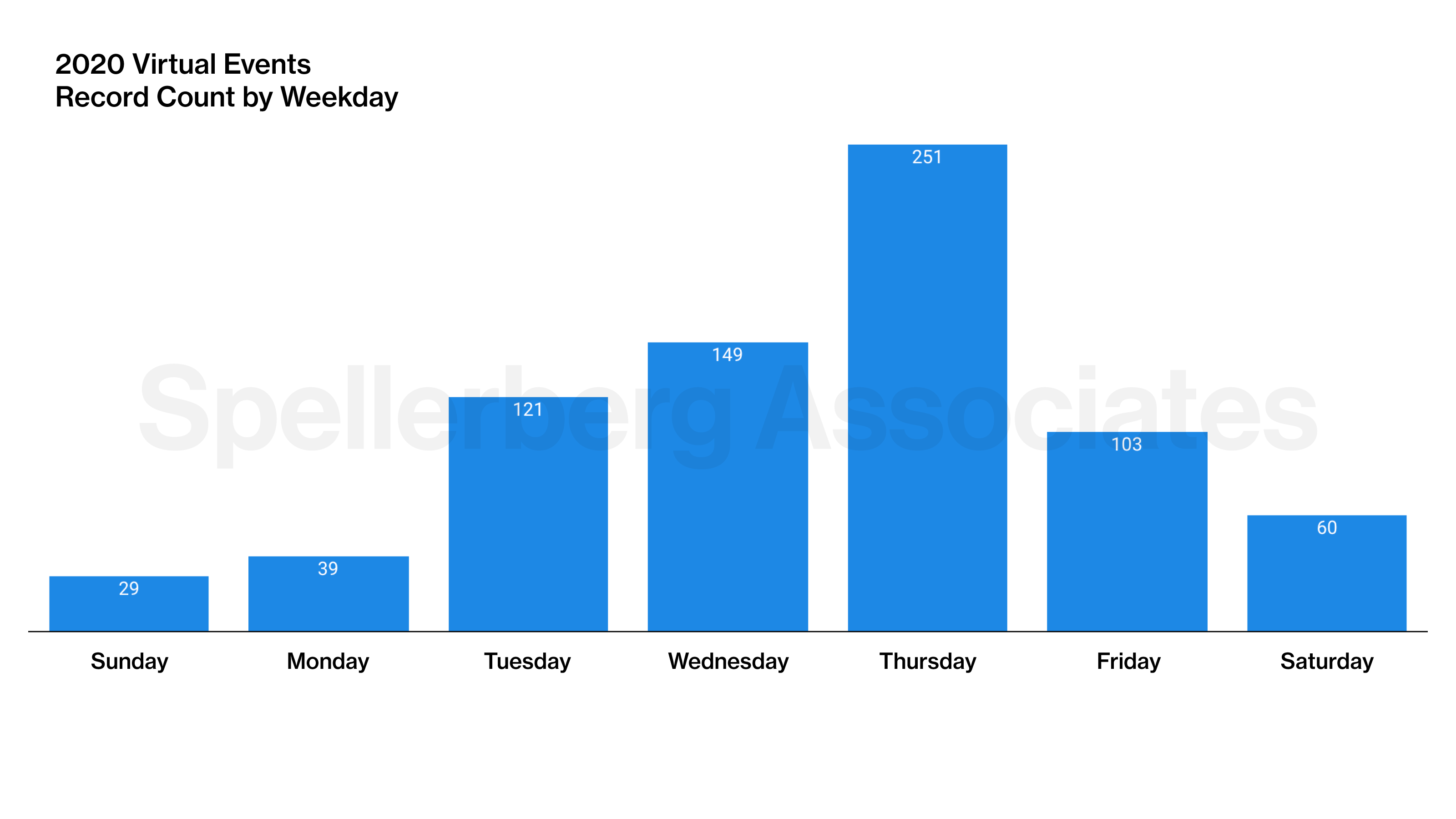
And here’s when the audience showed up, in raw numbers, also with a peak on Thursdays:
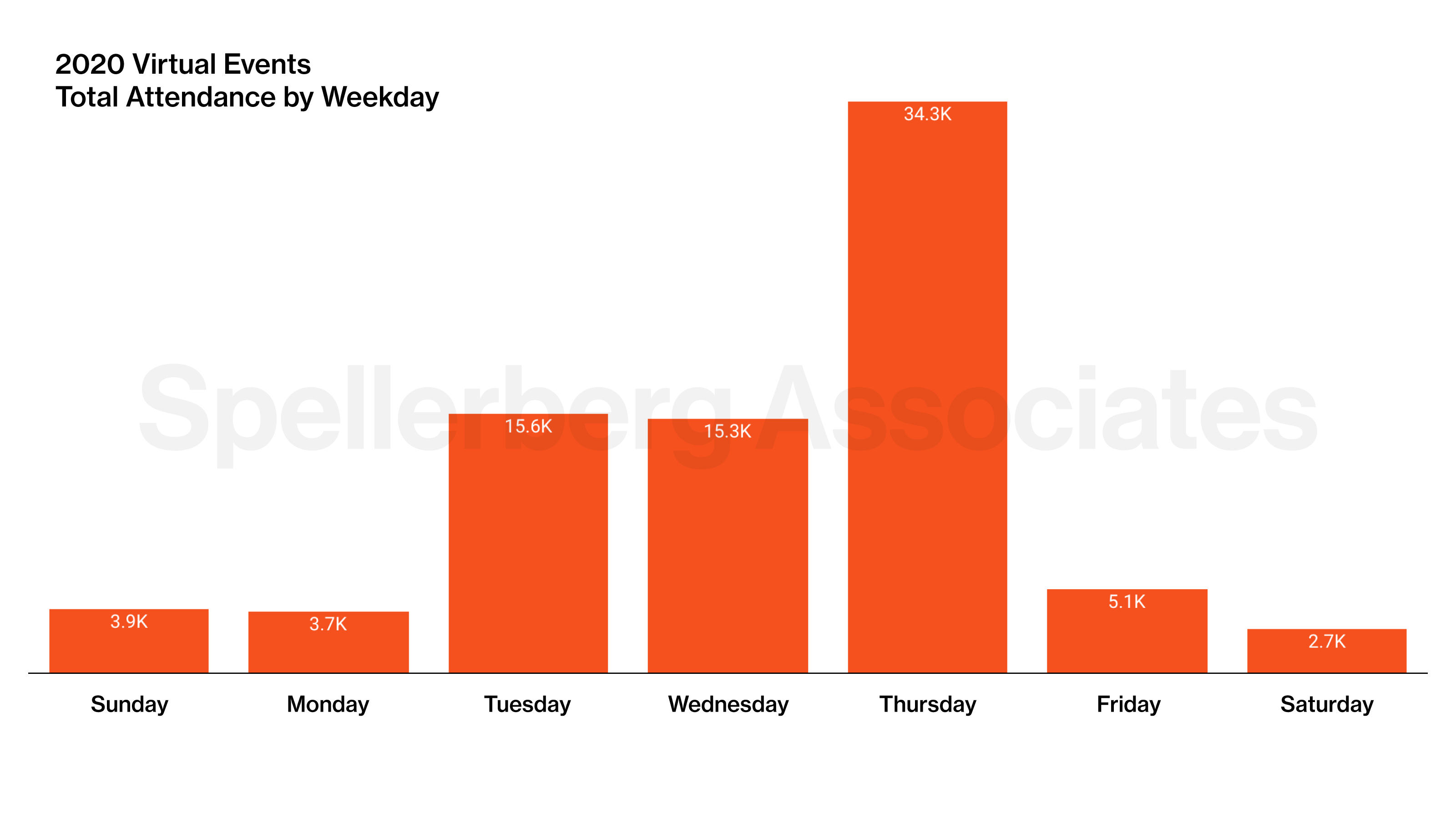
Again, those are okay as far as they go. But when we divide attendance by the number of events, we see that events from Sunday to Thursday had much higher attendance than those on Friday and Saturday:
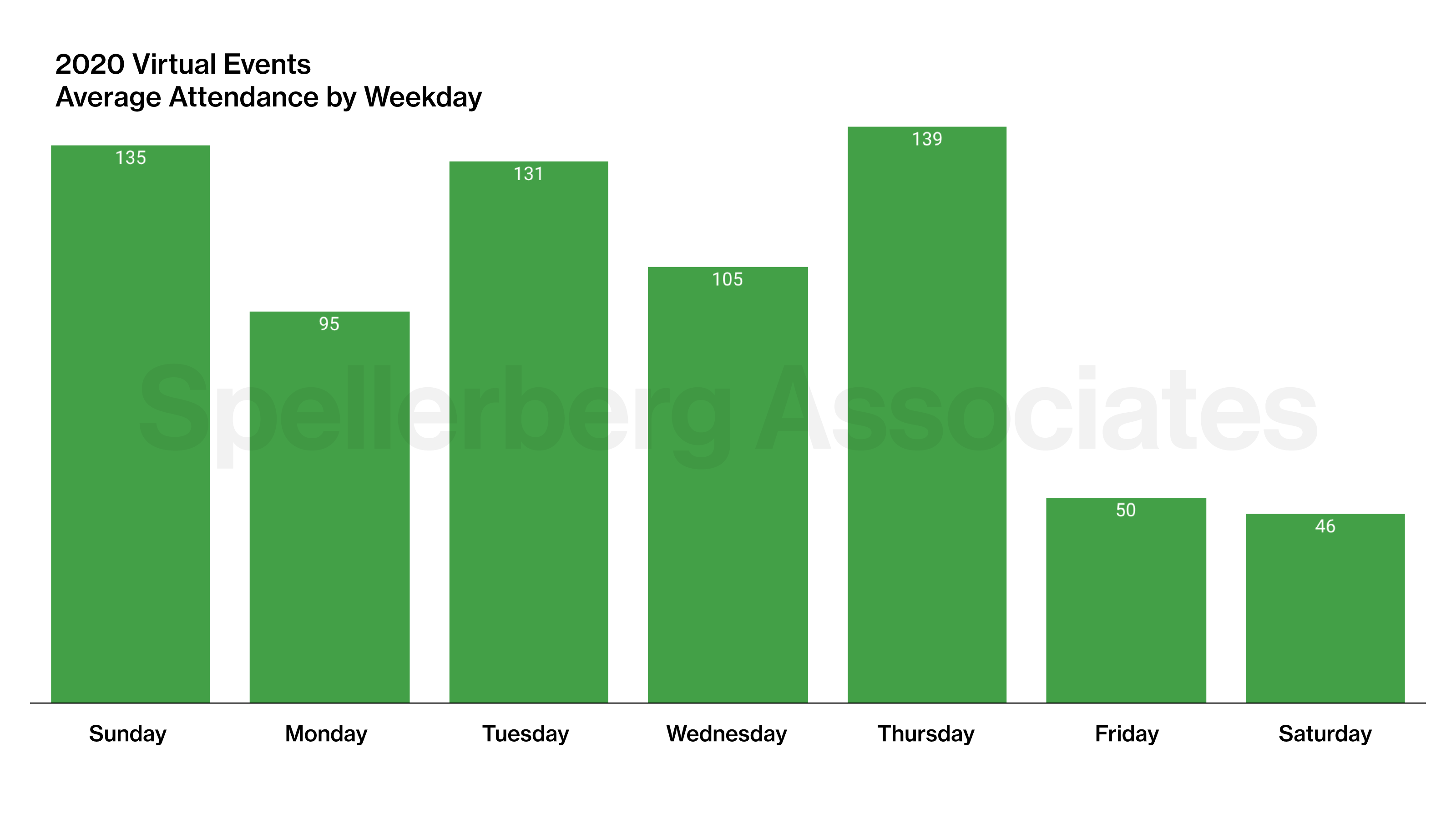
Based on these findings, we recommend institutions schedule more events early in the week. We understand that Sunday and Monday may be inconvenient for staff, but it appears the audience demand is there. Further, we recommend deprioritizing events on Friday and Saturday.
We conducted this research to support museum professionals who want increase attendance to their virtual events. We hope this data helps museum professionals identify elements of successful virtual events and apply them in their future programs.
— Marty Spellerberg and Grace Poole
Classifying Emails with AI for Fun (and Non-Profit)

I presented at the MCN 2025 conference this year, alongside designer and technologist Knut Graf. Our talk focused on an AI system we developed that classifies incoming emails based on multiple criteria, including subject matter, visitor type, and urgency. This system helps route messages to the appropriate team members with the relevant expertise, ensuring fair and timely responses.
This project originated from discussions I had with museum leaders at the 2024 MCN conference last year. As museums work to serve diverse audiences, email communication remains a vital but often tedious touchpoint. Managing a catch-all inbox, even after inbox rules have been applied, is a time-consuming task that feels endless. In my role as a digital consultant for museums, I recognized an opportunity to collaborate with Knut Graf, given his background in conversational analytics. We approached this project as a research endeavor and are seeking museum partners to continue the work.
The mission of MCN, the Museum Computer Network, is to enhance the digital capacity of museum professionals by connecting them to ideas, information, opportunities, proven practices, and each other. The MCN 2025 conference will be held at the Walker Art Center from October 20 to 22, 2025, bringing together cultural heritage professionals from museums and historic sites across North America and beyond.
What follows is an introduction to our project, written by Knut. For more details, including technical information on training the custom LLM, please visit the Graf Systems website.
—Marty
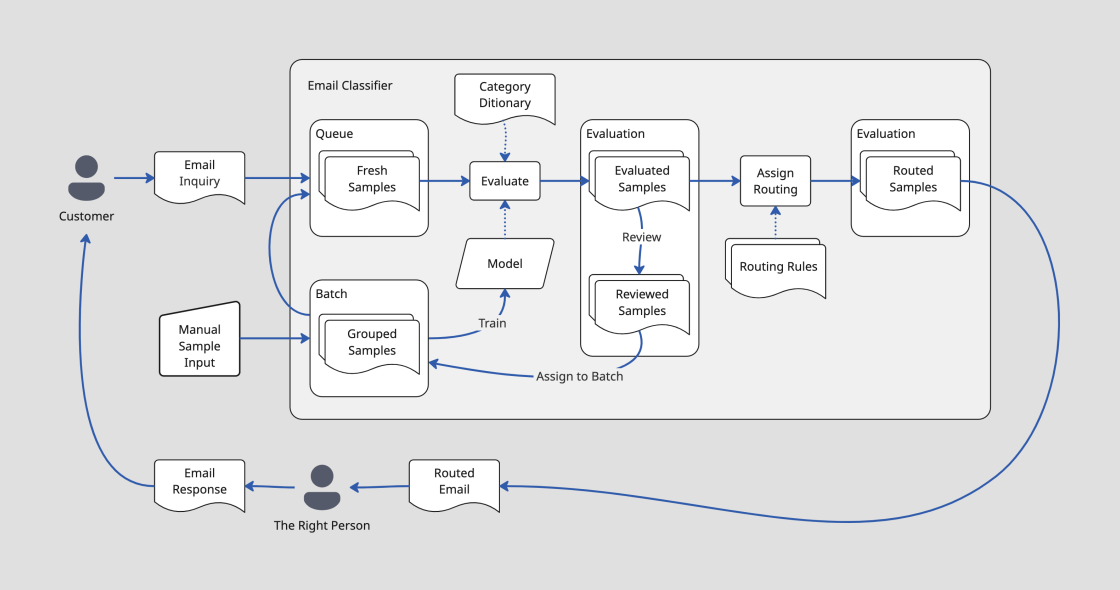
The Email Classifier Solution Prototype
A work-in-progress machine learning project that classifies emails being sent to a museum, identifying topics, visitor segments and urgency, as criteria to provide internal routing to the right people to respond.
The project presents a user-facing utility app that, in the “crawl” version, allows experimentation with samples and models, running inference, checking and correcting results, and management of sample batches. The utility app interfaces with the inference pipeline, which does the actual classifying of samples by a model.
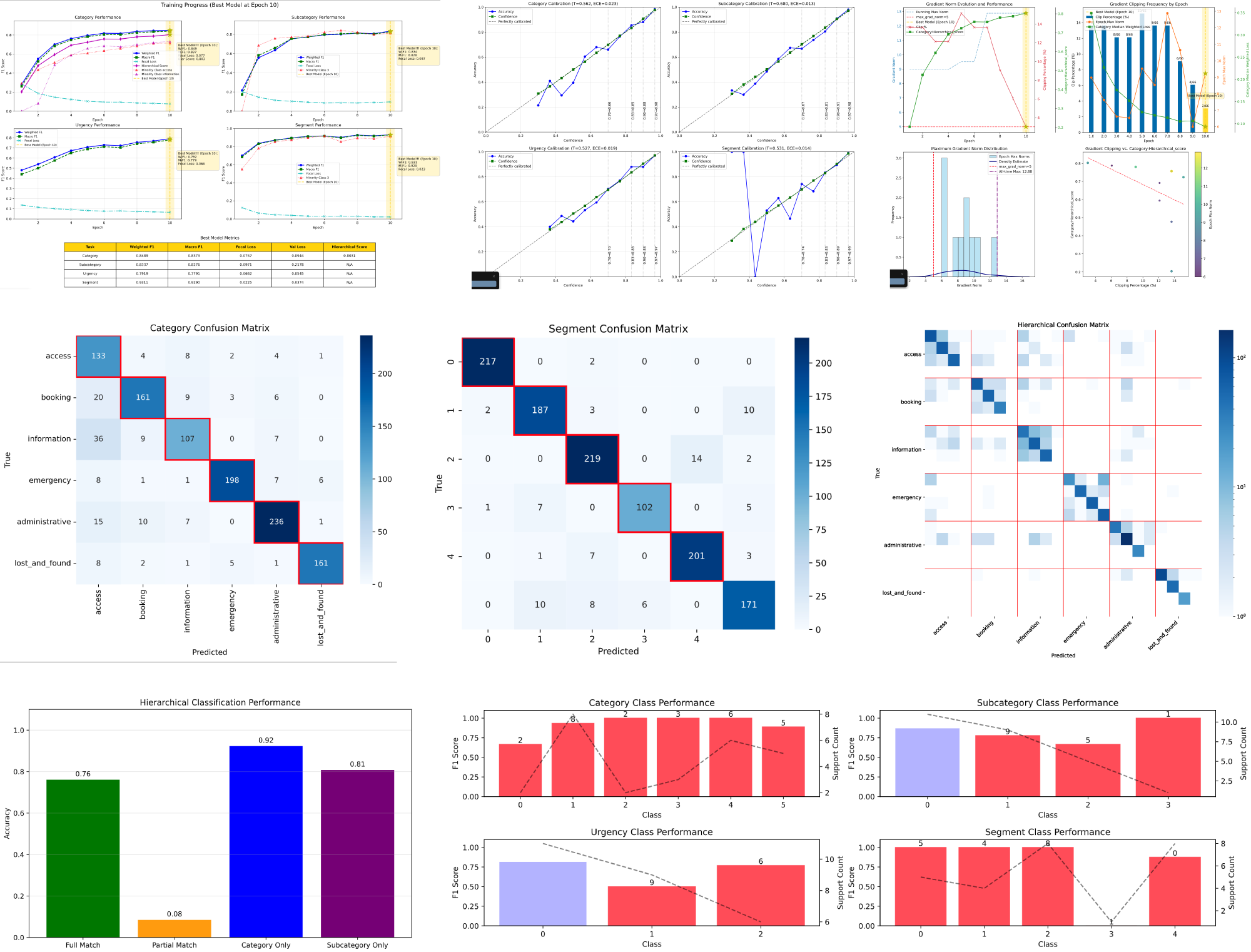
Behind the scenes, a training pipeline is a command line tool to do model training runs, using json files for parameters and visualizations to show training outcomes and model performance, to allow parameter optimization.
I am building this on the DistilBERT transformer (a relatively small model that can run locally) in Python with PyTorch. The user-facing front end prototype is a python app using SQLite, Vite, React and Ant Design with a token-based design system. I use Cursor, Claude, Claude Code and other LLM tools to build, and to generate training data.
The project complexity is well beyond “vibe coding scale”. I follow a “one-person product organization” approach, relying on documentation-driven process, step-by-step implementation and testing: (paper-) notebook sketches drive PRDs that flow into design documents, architecture documents, plans, and then prompts, for tests and for code.
Front End and UX Design Process
For the front end, I chose React (as opposed to something more modern) since LLMs are well-trained on it. This was helpful both for prototyping screens and for the actual implementation. Ant Design is a great design system to use because it has robust enterprise grade features, such as flexible tables, built in, which can otherwise be hard to deal with. Ant Design also offers a sophisticated design token system to keep CSS clean and simple.
To design the UX, I bypassed sketching in Figma. After doing paper sketches and taking notes, I iterated on a PRD document and on a feature-by-feature UX specification supported by sample .json data files. These documents informed a series of prototypes in Cursor. A prototype then served as a reference for implementation. The implementation always gets refined too: nothing like running code to experience and optimize flow. Eventually it is good.
I also explored doing actual sketches with Figma’s First Draft feature and with Google Stitch, but did not like being stuck with dead-end drawings. These tools also had a harder time creating results with appropriate amount of detail and structure. Figma Make could have been another option, but I just stuck with my default tools to get the job done.
—Knut
